Many people are surprised when they find out they can make incredibly beautiful (and large) coves moldings on the tablesaw. I know I was! In this episode, I’ll give you a rundown on the process for creating both symmetrical and asymmetrical coves. I’ll show you several ways to set up for this operation, but my favorite involves the use of a parallelogram jig that was inspired by a Fine Woodworking Article by Stuart Sabol (subscription required). His jig is primarily for setup only, so I figured why not make a jig that would also double as a fence system.
Once you have your coves cut, you’ll need to clean them up. Unfortunately the blade leaves a fairly rough surface. So I’ll show you a few good ways to smooth the surface to perfection.
And I didn’t mention it in the video, but the best blade for this type of operation would be one with a square tooth grind. That should leave you with the cleanest surface. My 40 tooth Forrest Woodworker II did a pretty decent job without any square teeth. And here is the link for the program cove calculation program over at FineWoodworking.com: Cove Angle Calculator
The Parallelogram Cove Jig
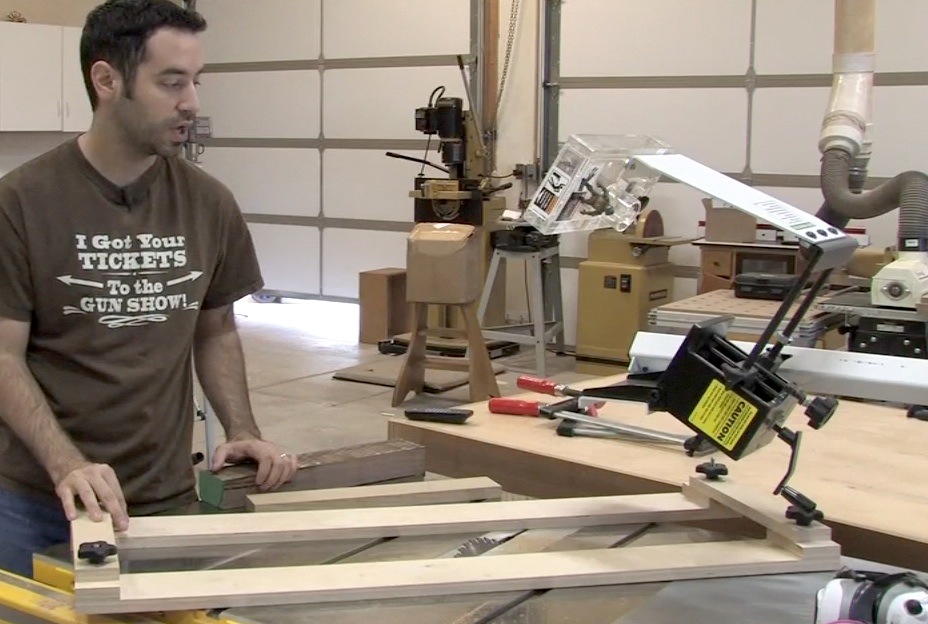
I made my jig from 3/4″ Baltic Birch plywood and several parts from a Rockler Jig IT Hardware Kit. Here are the dimensions of the jig parts:
2 main rails – 54″L x 4″W
2 cross-rails – 13″L x 1.5″W
8 rail supports – 4″L x 2″W
Remember that none of these dimensions are in stone. You might might to make your jig longer, wider, taller, etc.


This is perfect, i’ve been thinking about buliding a fram for some art my wife bought at an auction. I think I’m going to incorporate a cove in the final product.
Are there any safety concerns with the size of your table saw when using the method? I have an older craftsman portable table saw. Its a bit on the narrow side from front to back. I suppose support rollers or in-feed/out-feed tables would be sufficient to offeset the weight of the longer boards.
Can we call it a lucky coincidence?
1. My neighbour broke her beloved glass table bowl 4 days ago…
2. a present I ordered for her early december didn’t arrive in time…
3. browsing around I found this technique…
4. I happened to have some nice Maple leftovers from some window sills….
5. all this together turned out into a new table bowl…
6. so I had a fairly nice shaped, personal and creative X-mas present for her after all …and she liked it :)))
I’ll post some making-of-pictures on my blog!
Merry Christmas and a happy 2013 to you all.
Edward
Well done Marc. I’ve used my router table for smaller versions of that cove but was looking for a good way of making larger cuts. I’d heard of this technique, but wasn’t sure how to get started to get it right. Learned a lot as usual. Thanks again.
Excellent video Marc. I never would have guessed that assymetrical coves were anything other than the product of trial and error and more than a bit of guessing.
I do have a question. Fairly new to the hobby and want to make sure I get the terms right. You used two aids in this video for setup and sanding. You referred to the sanding tool as a dealie, but the angle finder was a dealie-whacker.
What is the proper usage of those terms and what is the real difference? I’d hate to embarrass myself in front of experienced woodworkers by using the wrong one.
Was the sanding tool the one that conforms to the shape? I am not sure there’s a good name for that. It’s a “sanding tool that conforms to various profiles”, lol. Maybe a “profile sanding block” might be a good description. The angle finder was a bevel gauge.
Sorry Marc. I was trying to be clever by asking for a differentiation between dealie and dealie-whacker. I failed. :) Have a great holiday.
lol well it is my fault for using such complex terminology in the first place. You see, a dealie is like a more basic version of a dealie whacker. So you can expect to pay significantly more for the additional whacker functionality. That pretty much sums up the difference. :)
Interesting way to use a table saw, you are right this goes against everything I have ever learned about how to use it. I like jigs.
Great video Marc!. I used this technique to make some crown molding to match the rest of the room for trimming out some built-in cabinet / bookcases.
I have another suggestion for a sanding block. I’ve had good success with using 2″ thick extruded foam insulation board to make custom concave or convex sanding blocks. You can use a rasp to cut the profile, then just use adhesive backed sandpaper or regular paper with spray adhesive.
Hey Marc what gives with your videos I can’t watch anything. A while back I got this red screen saying I needed a Blip player. I checked out Blip.com and E-mailed them asking them why I couldn’t watch your program. They E-mailed the following : “As that message explains we do not allow playback outside of the Blip player and are taking more aggressive actions toward limiting this behavior as it causes excessive bandwidth usage and many times is used by accounts to circumvent our add network in favor of their own.” Then they said I could find directions how to embed a code to watch a single episode player at their web site. Whaaaat. Their telling me that I can’t watch any episode on you own web site but have to go to theirs. Whoaaa! Today I see your format has changed but still can’t watch anything. Got an answer?
Sincerely, A sad woodworker.
Hey Jerry. I know Blip made these restrictive changes recently and it’s a real shame. To my knowledge, this only affects direct downloads. Some people can still download though and it depends on what browser you’re running and with what operating system. Either way, the policy sucks, but we’re stuck with it. That said, there should be absolutely no restrictions on watching the embedded version here in our site. I haven’t heard any other complaints other than one guy on Lumberjocks that couldn’t the embedded version to play. The video has been downloaded and viewed nearly 20,000 times already so this is definitely not a widespread issue, which would make it very tricky to diagnose. So I would suggest two things. First, makes your browser is updated fully and make sure your Flash is updated. Second thing to try is a different browser.
The final solution is to perhaps use something like iTunes to download the videos. Blip has not yet blocked that particular method of downloading.
Sorry for the inconvenience, but this is what we get for using a free service. Well technically it isn’t free as I do pay for the “pro” service, but apparently that doesn’t buy me much love in this regard.
Great video! Thank you. Is this process hard on the blade? Does it dull it faster? Do you use you normal saw blade, or do you use a special blade for cutting coves?
I don’t think it dulls the blade any faster since you’re just cutting wood like you always do. You’re just cutting a lot of it. I use a regular ATB blade for this but as mentioned in the article above, a square grind blade would be ideal.
Thanks Marc! This is awesome. I don’t have a project at the moment requiring a cove but I can’t wait to incorporate this into a project. Thanks again.
Marc, just wanted to thank you for the informative videos you have produced. I am a hobby woodworker, and wish my day job would quit gettng in the way of the funner (is that a word?) things in life! I’ll keep watching and learning, you keep up the great site! Thanks for helping us weekend warriors!
What would be the best blade choice for something like this? Am I unnecessarily concerned about deflection with a thin kerf blade?
A square tooth blade is best. And I don’t use thin kerf myself but I imagine if you take it slowly with light cuts, you’ll be fine.
Marc, have you tried using a festool LS130? Would it work well in this situation?
michael e. i believe the yellow sander said ex factory on the side of it
I just found your site and I just have to say you guys are amazing. This video was really cool, I would have never imagined you could do something like this with your table saw. I’m really looking forward to going through the rest of your videos and and seeing future videos but for now I just wanted to say thanks!
Someone mentioned Rocklers jig…I bought it on sale a while back but have yet to use it. I like yours better and looks like it would handle thicker stock better, and I dont think rocklers is guaranteed to be parallel…however, rocklers does have miter slot bars so it securely stays put. Nice work and thx for this.
Great video, but I’ve got to ask, what was that little yellow sanding block you used that you could adjust to the shape of your contour?
It was a free gift at a woodworking show. I’ll have to track down the manufacturer for you. IF I can find it. :)
Another way to sand out the cove is to build a little box out of lightweight cardboard which covers the whole width of the work piece, and has the bottom edges cut to match the contour of the cove. Then place a “more-than-big-enough” piece of cling wrap over top of the work piece, set the cardboard box on top of that, and fill the box with some prepared auto body filler.
Once the body filler has set, you will have a perfectly form-fitting sanding block that covers the while width of the cove. If you have a number of large pieces to sand, this will speed the process greatly.
Great video Mark, can’t tell you how much I appreciate all your efforts with the Woodwhisperer… Rock On!!
doing this to make my own crown molding for a built-in
Love your shirt…
Mark,
I think you got it right the first time, the cove offset was 1/2″ and you marked it that way on the piece. The cove height was 3/4″. The added text in the video corrected your audio saying the offset was 3/4″. I think you got it right in your audio. Or did I miss something?
Thanks for the information. Where have you used this technique on a project?
Keith
Once again, well done. Very imformative video!!! The possibilities are endless!!!
I was paging through the Rockler professional catalog just now and on page 37 I see that Rockler is selling a souped-up version of your cove cutting jig. They call it, “An ingenious clamping system…” :)
great video marc
something funny happening in the vieo for me aswell. your voice was a bit out with your mouth moving. kinda looked like when you see someone foreign talking but it is dubed in over them ,lots of mouth movements but no sound.
i really must try this sometime. i have no use for the resultant piece but i want to play anyway.
i would agree with putting the bridge piece underneeth.
how do you feel this teckneque works when doing a whole projects worth of components.
It is certainly a time-consuming technique, but it does work. And even a full project’s worth really wouldn’t amount to that much material. I imagine it would be used for trim or molding so there shouldn’t be too many linear feet.
FYI, CMT makes a special cutterhead just for this operation: http://www.amazon.com/CMT-235-.....s=cmt+cove
I bit pricey (although the price seems to have come down alot from what it used to be), but maybe it’s worth it if you do alot of these cuts. I’ve nver talked to anyone who has ever used one. It would be nice to see someone review it sometime (hint, hint. ;)).
Clicking that Blip button starts the audio somewhere else. I couldn’t find where it was playing. I had three audio feeds going at once, one from the actual video and two others from the ether. I’m using Windows 7 and Chrome. Very spooky!
Great video by the way
Great show I have seen this done several times But nobody realy shows all the steps Thanks for taking the time to show this step by step
And thanks for the Spagnuolo Fix
Maybe an idea for a jig to operate thick pieces without limits.
Try doing the jig long enough to go outside the table and… flip it over to have connecting bars below the long rails.
Just an idea :)
Best regards
– Andrzej
A sketchup draft of my idea:
https://dl.dropbox.com/u/6075617/jig.jpg
Regards
– Andrzej
After clamping the rails down couldn’t you just take the bridge pieces off the ends? Then it wouldn’t matter how tall the piece is.
I noticed in the last scene of the video demonstrating the spacer blocks to allow thick stock to pass under the cross arm that the spacer block was skewed at and angle. This lets the corner of the spacer project into the path of of the work piece. I suggest that the spacer be significantly smaller so that if it does rotate or if it is not aligned perfectly when tightened, that no part of it will project into the path of the workpiece.
Sure!