
Cutting Board Design Software

This project is a bit different, as it is actually a piece of software, designed and submitted by Jay. Let’s check it out”

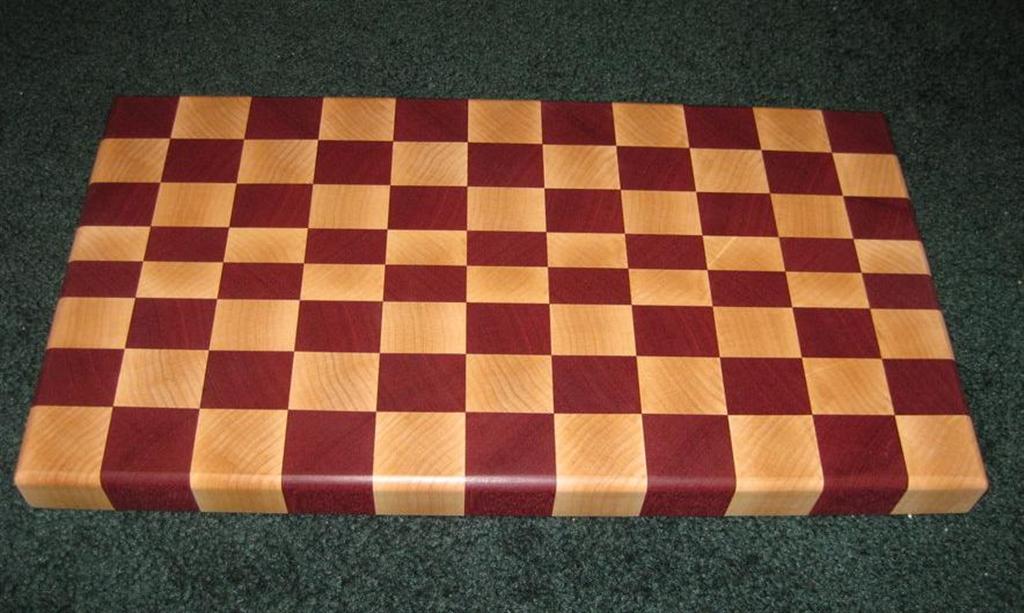
“Hi Marc! Long time listener, first time writer. First of all, I just wanted to say what a great job you do. Your videos and blog are absolutely informative and easy to follow for an amateur woodworker such as myself. I look forward to everything you put out. I just started putting together my basement shop late last summer. In fact the sole reason why I got started in woodworking was because I got hooked after watching your cutting board video (and promptly watched the rest of your videos), so many thanks to you! Since then I have engulfed myself with as much woodworking text as I can. After building an end table and some shop furniture, I actually got around to making my first cutting board based on your design. I attached a picture of it for your information, finished according to your videos. I really liked how it turned out.”

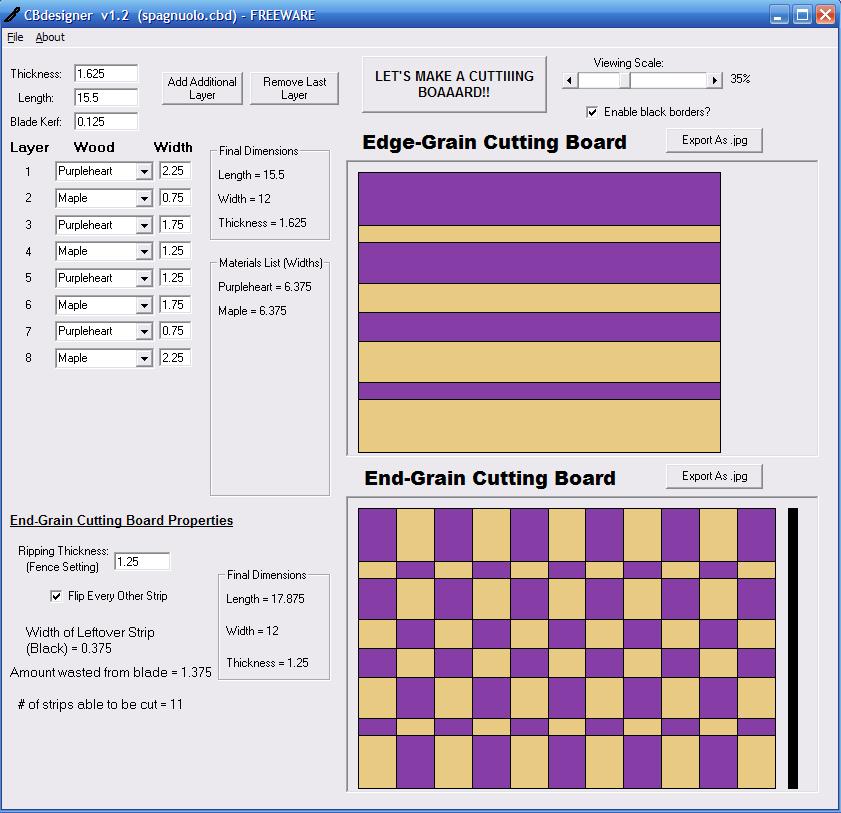
“Anyway, I wanted to try out new designs so I tapped into some of my limited programming background that I have and made a program in Visual Basic (I deemed it, CBdesigner) that lets you virtually design a cutting board in a matter of minutes by defining each layer. Also attached is a picture of the program showing your own design to illustrate how it works. I made a shout out to you in the program (I’m sure you can recognize it). I posted it at Lumberjocks to see what other people thought of it. I’ve been doing some small updates to the program based on people’s recommendations. I know you’re Mr. Apple so I’m not sure if it can run on your Mac, but I just thought you might be interested in it too. :) Not sure if a program qualifies as project of the week or not but I thought I’ll let you know know about it.”

Latest Version

cb-large cbdesigner

Comments

  1. That is a great idea for a program. Good Job Jay

  2. Very Cool, Thats a great way to come up with new designs and color scemes. Thanks!

  3. Tom May 12, 2009

    Fantastic! I’ve built about 10 of “Marc’s” cutting boards. I’ve also experimented with differing patterns, but I was not pleased with any of them because it was very hard for me to imagine what the final result would look like before making the cuts and glue ups. My brain doesn’t process spacial things well. This makes things super simple for a simple brain.

  4. Pierre May 13, 2009

    Great job and nice initiative.

    Sure help in giving you a pre-look of the finish product.

    pierre

  5. Blake C May 13, 2009

    Assuming it is in VB.NET, us mac folks can probably run it using a thing called “mono” from macports. I write a lot of c# windows forms apps for work, and manage to run them them this way actually on my mac.

    Anyways, this is very cool software–I love it when people do things like this because woodworking software is rare :)

  6. Chester May 13, 2009

    I wrote to Jay already but I think that the real value of the program may be in helping to buy rough-sawn wood. When I did my first board, my wood supplier did not have 6/4 pieces. He had 5/4 and 8/4 pieces, so I had to do some fast recalculations to try and figure what it would do to me if I used 5/4 pieces. Everything turned-out well but it was a “leap of faith” in a cold wood barn.

  7. Big Bill May 13, 2009

    Very cool ! Thanks for this. I was able to download and run off of your Lumberjocks post. Works great.

  8. Grantman May 16, 2009

    Hey, Blake C, what do we Mac users use again? I’ve never heard of mono. What is is and where do I find it?

  9. Isidor May 17, 2009

    I am having trouble downloading. It says that I have A file missing. Do I need to register? Having trouble with that also. Any Ideas?

  10. Isidor May 17, 2009

    maybe I cant use on vista?

  11. Ken in KANADA!.. Eh!? May 17, 2009

    It is a nice program! I would like to eventually see an expanded selection of woods but more importantly it would be really cool if we could add angle designs like 45 Deg. angles or segmented type of designs like you would see in woodturners segmented bowls and stuff. I realize that may take a bit of time to free up the design possibilities but once done it would be well worth it!!

    Keep up the great work!

  12. Tim Dorcas May 18, 2009

    I have been making a lot of cutting boards lately and using this application is critical for confirming my design decisions. It really helps to take cutting boards to the next level. Thanks!

    Tim

  13. Isidor May 19, 2009

    Anyone have the software on vista??? I still cant download

  14. jeff s May 22, 2009

    another software option is Lamination Pro for PC ( or Mac using Boot Camp )

    http://www.woodturnerpro.com/software/lamPro.html

    Lloyd Johnson a woodturner who developed the software for segmented turners. I saw the product demonstrated at the Segmented Turning Symposium held at the Marc Adams School of Woodworking (MASW) last November.

    I could easily see using the software for cutting boards; Or for you period furniture folks who want to make your own bandings. Steve Latta teaches a Decorative Details class at MASW each year (stringing, bell flowers, cuff feet, bandings,etc. )

    Hope this helps

  15. CrackPotWoody June 13, 2009

    Jay,

    I wanted to say Thank You for creating and making this available to us.

    I make a lot of cutting boards, both endgrain and flat.

    This will definitely be a tool I will use on a regular basis. It’s simple to use and gives a great visual before making a cut. I’m looking forward to creating some new designs.

    I also like how you’ve been willing to take input from users and expand on it.

    I’m looking forward to more enhancements. Keep up the great work.

    Thank You,

    CrackPotWoody

  16. Just wanted to say thanks. I am currently working on a cutting board and butchers block island for my wife and this tool is a great time and wood saver.

    Thanks again!!

  17. Moabite1978 November 18, 2009

    Can you suggest different butcher block patterns or a site where I can check out diff patterns BEFORE I start cutting my wood…thank you so much. Your Youtube videos rock!!! You gotta be kidding me, funny and super informative. Thanks!!!

    •  
      thewoodwhisperer November 18, 2009

      Thanks for the kind words! Honestly, no, I don’t know of any place where you can check out the different patterns. But I have seen some really crazy ones. If you use a board that has both heartwood and sawwood in it, like walnut or cherry, you can get some AMAZING looking boards! But when trying new designs, I think you’re just going to have to experiment. You might even consider using some construction paper and playing with designs. Different color paper might help you visualize how things are going to turn out.

      Thanks for checking out the site!

      • Frank Kovach January 27, 2010

        Don’t you mean sapwood?

  18. Frank Kovach January 27, 2010

    I don’t have “THE SOLUTION” to the cutting board design issue, but I made two cutting boards following Marc’s design EXACTLY. Well, make that one and a half. The second I made thinner but I got a longer board out of it. Anyway, since then I have made a total of four. I have saved on my computer 12 different google sketchup files with 12 different final patterns that I thought I liked the looks of. I haven’t figured out a [easy] way to design from rough wood to finish product, but after a comical cutting board session in the shop (which I gave to my sister as a Christmas present) I figured out this rule of thumb: when you are cutting your initial rip cuts out of your stock, use as many different species as you want (my sister’s board used four). The width of your first glue up (minus any cuts to square up) is the width of your board. Your second round of cuts-the width of those cross cuts will be the depth of your board, and you figure the length by how many of those cuts you will be able to make. I don’t worry too much about making it the perfect size. So far all of mine have been different sizes, and that’s okay, in my book. But THE MOST IMPORTANT THING, if you want symmetry in your pattern, is to make sure you follow this rule: your first assembly must be symmetric! Whatever size you cut the boards to, this pattern must mirror itself. It sounds simple (and probably is-all of you are probably groaning at the idiot pointing out the obvious) but I just use what I call the mirror method. No matter what sizes I’m going with, I assemble from left to right, and when I reach the middle, I mirror what I just did to finish it out. Or, if you don’t want symmetry in your pattern, just do what I did with my sister’s board, and then call it “edgy.” :)

  19. Doozer September 5, 2010

    I just stumbled across this
    Cbdesigner software, it would really be helpful to me. But for some reason i cant get the program to run with windows 7 . Even tried all the different ways to fix it. … Does anyone know if it will run under wondows 7? And does the creator of the software offer any help?

  20. Dave KLein December 7, 2010

    Cant get it to run on windows 7 either

  21. troy November 11, 2011

    i am tyrying to run this as well with no luck. any advice or help out there?

Leave a reply

XHTML: You can use these tags: <a href="" title=""> <abbr title=""> <acronym title=""> <b> <blockquote cite=""> <cite> <code> <del datetime=""> <em> <i> <q cite=""> <strike> <strong>

Coming Up


  • There are no upcoming events

  • Video: Flattening a Benchtop With a Router

    May 23, 2012
  • Wood Talk Online Radio

    May 23, 2012 - 5:00 pm MT
  • Adirondack Chair Class (William Ng School)

    June 4, 2012
  • Video: Turning a Tool Handle

    June 6, 2012
  • Woodworking in America (Pasadena)

    October 12, 2012

Live Shop Cams


Enter the live room →

Pressure Treated Wood Utility Poles for building structures, distribution or transmission.

Cliq Studios sell quality Kitchen Cabinets in a range of woods including cherry, oak and maple.


what wa